Editor portal

The Case for Modern Image Formats: Why JPEG Isn't Enough Anymore
For over three decades, JPEG has been the workhorse of web imagery. Released in 1992, it brought the revolutionary ability to compress photographs into manageable file sizes, enabling the visual web we know today. But the web has evolved dramatically since then. User expectations for speed, visual fidelity, and rich media experiences have outpaced what JPEG—and its companion formats GIF and PNG—can deliver.
JPEG's fundamental limitations are becoming increasingly costly. While it offers decent compression, it introduces blocking artifacts, color bleeding, and pixelation at smaller file sizes. GIF, meanwhile, is notoriously inefficient for animation, often producing files many times larger than necessary. PNG excels at transparency but falls short on compression for photographs. These legacy formats were designed for a slower, smaller internet where a 100KB image was acceptable. Today, that same image could cost you visitors, conversions, and search engine rankings.
Enter AVIF and WebP. These modern formats were built from the ground up to address the demands of contemporary web performance. AVIF, released in 2019 by the Alliance for Open Media, leverages the AV1 video codec to deliver stunning compression efficiency—often producing files 50% smaller than equivalent JPEGs while maintaining superior visual quality. WebP, Google's offering from 2010, typically achieves 25–34% smaller file sizes than JPEG at the same quality level. Both formats support features that JPEG simply cannot match: transparency, animation, and, in AVIF's case, high dynamic range (HDR) and up to 12-bit color depth.
The stakes are high. Research consistently shows that even a one-second delay in page load time can significantly impact user engagement and conversion rates. With over 93% of web users on browsers supporting AVIF as of 2024, and WebP hovering around 97% browser support by 2026, there is no longer a compelling reason to rely exclusively on JPEG. The question is not whether to adopt modern formats, but which one to choose—and how to implement them effectively.
AVIF vs. WebP vs. JPEG: A Technical Comparison of Compression, Quality, and Features
When evaluating image formats, the most critical metrics are compression efficiency, visual quality, and feature support. Let's break down how each format performs.
File Size and Compression Efficiency
AVIF is the clear leader in compression. Netflix's 2020 tests demonstrated that AVIF delivers superior compression efficiency with fewer blocking artifacts and less color bleeding than JPEG. In practice, AVIF files are typically about 60% the size of equivalent-quality JPEGs, with some comparisons showing reductions of 40% to 90%. One head-to-head comparison of the same source image yielded AVIF at 25.3 KB versus JPEG at 76.8 KB—a staggering difference.
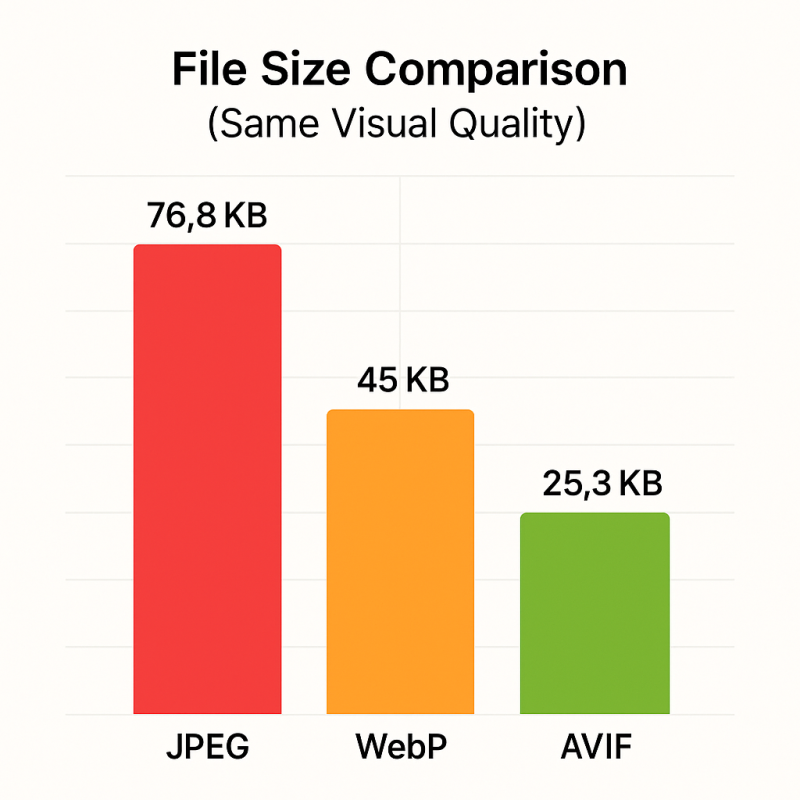
WebP is no slouch either. Multiple studies confirm that lossy WebP is 25–34% smaller than JPEG at the same Structural Similarity Index (SSIM) quality metric. At JPEG quality Q=75, WebP files were 69% to 73% of JPEG file sizes across tested datasets. However, AVIF often produces files that are 20–30% smaller than WebP for comparable quality, giving it a meaningful edge.
Color Depth and HDR Support
This is where AVIF pulls decisively ahead. AVIF supports 8-bit, 10-bit, and 12-bit color depths, along with wide color gamut and HDR via PQ or HLG transfer functions. WebP is limited to 8-bit color. For photography, video content, and any application requiring precise color reproduction or smooth gradients, AVIF's higher bit depth eliminates the banding that plagues 8-bit formats.
Transparency and Animation
Both formats support transparency, but with different strengths. AVIF supports alpha transparency for lossless images, while WebP supports transparency for lossy images. For animation, AVIF is remarkably efficient: animated AVIF files are on average 78% smaller than equivalent GIFs. WebP also supports animation, making it a strong GIF replacement. JPEG supports neither transparency nor animation natively.
Lossy vs. Lossless Compression
AVIF offers both lossy and lossless compression, with lossless compression significantly outperforming compressed Bitmap and PNG. WebP also supports both modes, with lossless WebP images being 26% smaller than PNG. However, AVIF provides approximately a 10% improvement in lossy compression over WebP for photos and text images.
Encoding Speed and Computational Cost
The trade-off for AVIF's superior compression is computational intensity. Encoding AVIF images requires more processing power and time compared to WebP. WebP has faster encoding and decoding speeds, which can be critical for sites that process uploaded images or generate images dynamically. For static assets encoded once and served many times, AVIF's longer encoding time is a one-time cost that pays dividends in bandwidth savings.
Browser Support and Adoption: Where AVIF and WebP Stand in 2026
Browser support has been the traditional barrier to adopting new image formats, but that barrier has largely crumbled for both WebP and AVIF.
WebP Support
WebP enjoys near-universal browser support, exceeding 97% as of 2026. All major browsers—Chrome, Firefox, Safari, Edge, and Opera—support it fully. Safari added support in 2020, completing the picture. On the operating system side, WebP is supported natively on Windows, macOS, and Linux, with Android adding support in Android 4.0 (Ice Cream Sandwich).
AVIF Support
AVIF's adoption has been rapid. Google Chrome 85, released in August 2020, was the first major browser with full AVIF support. Firefox followed in 2021, and Safari joined in 2022. As of 2024, over 93% of web users worldwide are on browsers that support AVIF. Android 12, released in October 2021, added native support. On desktop, AVIF is supported on Windows 10 and 11 via the free AV1 Video Extension, and natively on macOS Ventura and iOS 16. Adobe Photoshop added native AVIF support (open, edit, save) in its June 2025 release, and WordPress 6.5 added AVIF support, making it accessible to millions of sites.
The Legacy Browser Gap
The remaining 3–7% of users on older browsers (including Internet Explorer and Safari 15 and older) do not support AVIF and may not support WebP. This is why a fallback strategy is essential. A browser that does not support a given encoding will simply discard the image file and render nothing, creating a broken experience. The solution, as we'll explore next, is the HTML <picture> element.
Practical Implementation: Serving AVIF and WebP with Fallbacks for Legacy Browsers
The most reliable method for serving modern image formats while ensuring compatibility is the HTML <picture> element combined with multiple <source> entries. This approach allows you to specify image sources in order of preference, and the browser will select the first format it supports.
Here is the recommended implementation pattern:
<picture>
  <source srcset="image.avif" type="image/avif">
  <source srcset="image.webp" type="image/webp">
  <img src="image.jpg" alt="Description of image">
</picture>
In this example, browsers that support AVIF will load the AVIF version. If AVIF is not supported, the browser falls back to WebP. If neither modern format is supported, the browser loads the JPEG fallback. You can extend this pattern to include PNG for transparent images or GIF for animations.
For responsive images with multiple resolutions, integrate srcset within the <source> elements:
<picture>
  <source srcset="image-800w.avif 800w, image-1200w.avif 1200w" sizes="(max-width: 600px) 100vw, 50vw" type="image/avif">
  <source srcset="image-800w.webp 800w, image-1200w.webp 1200w" sizes="(max-width: 600px) 100vw, 50vw" type="image/webp">
  <img src="image-800w.jpg" srcset="image-800w.jpg 800w, image-1200w.jpg 1200w" sizes="(max-width: 600px) 100vw, 50vw" alt="Description">
</picture>
This approach ensures that every user sees an image, regardless of their browser, while maximizing performance for the majority on modern browsers. Major CDNs including Cloudinary, Cloudflare, Akamai, Imgix, and Fastly support AVIF and WebP delivery, often with automatic format negotiation based on the browser's Accept header.
Performance Impact: How Image Formats Affect Page Speed, Core Web Vitals, and Bandwidth Costs
The performance benefits of modern image formats are not theoretical—they have been measured in real-world deployments.
Page Load Speed and Core Web Vitals
Google's Core Web Vitals measure loading performance (Largest Contentful Paint, or LCP), visual stability (Cumulative Layout Shift, or CLS), and interactivity. A good user experience requires LCP within 2.5 seconds and CLS of 0.1 or less. Images are often the largest elements on a page and directly impact LCP.
Netflix observed improvements in time-to-render (TTR) metrics after A/B testing AVIF-SDR image assets across various browsers and network connections. By reducing image file sizes by 50% or more compared to JPEG, AVIF directly reduces the time required to download and display the largest contentful element. WebP-optimized websites similarly tend to score higher on Core Web Vitals, making both formats valuable for SEO performance.
Bandwidth and Storage Savings
For high-traffic sites, the bandwidth savings are substantial. AVIF images can be up to ten times smaller than JPEGs of similar visual quality, with typical reductions of 40% to 90%. A single image that drops from 76.8 KB (JPEG) to 25.3 KB (AVIF) saves 51.5 KB per request. For a site serving millions of images daily, that translates to gigabytes of bandwidth saved per day, directly reducing hosting costs.
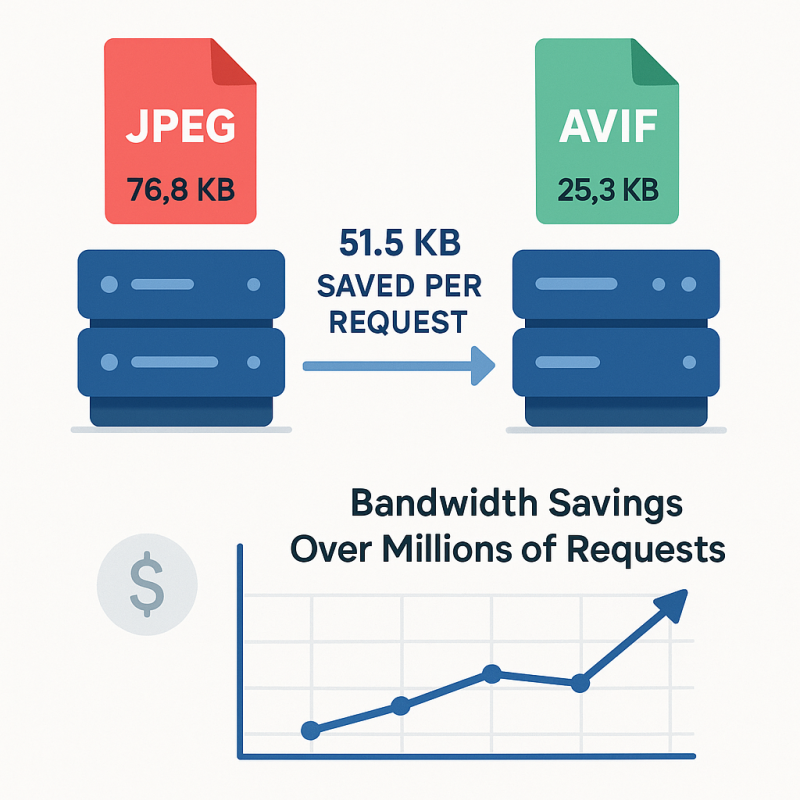
Platforms adopt AVIF and WebP to reduce storage, bandwidth, and backup costs. Even a 2 KB reduction per image—such as shaving 2 KB off a logo—can save 16 Mbps per